Ghost Commander File Manager v1.51.4
Requires Android: 1.6 and up
Overview:
Ghost Commander is a dual-panel, customizable, ad-free and donation supported open sourced file manager which will let you to manage your files or tweakyour system in the root mode.
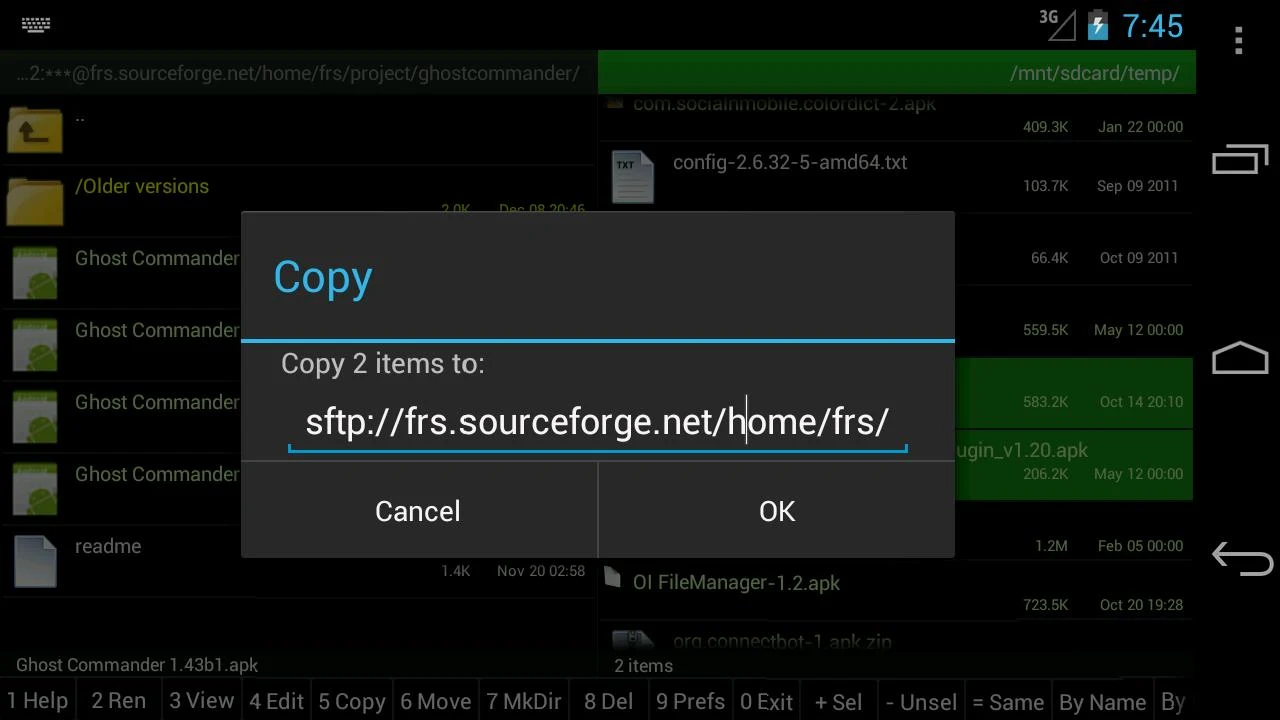
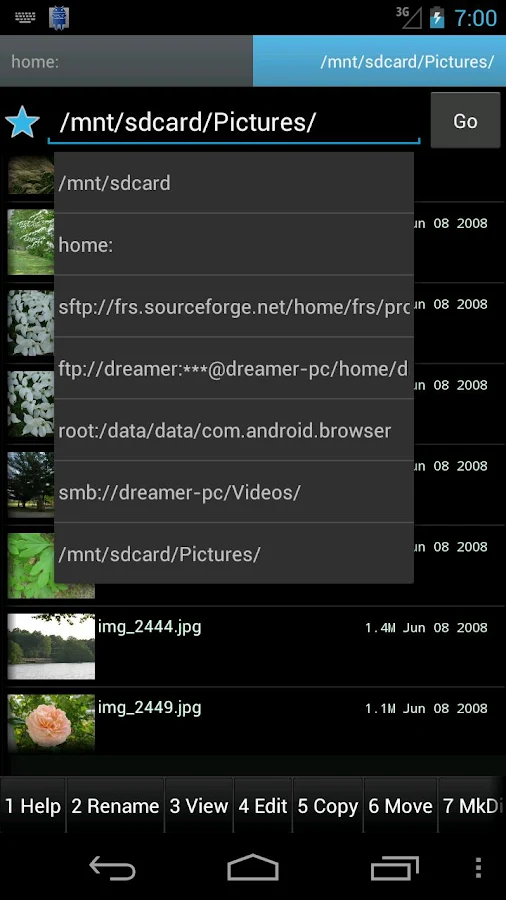
Copy and move files from one panel to another. This method of operating is far more convenient than what is offered by some other file managers, in which you would have to copy/cut items and then navigate to various different folders to paste them – back and forth, again and again.
Open files and folders by simply tapping on the left and select single or multiple items by tapping on the right side, where the size/date info is situated.
Besides the basic file manager functions you would expect, Ghost Commander lets you transfer files both to and from FTP and SFTP servers and Windows network shares (SMB plugin required), Google Drive, BOX cloud storage, plus it can create/extract ZIP archives and view inside them before they’re extracted.
For advanced users, this file manager also fully supports root (superuser) mode, which is essential to work with critical system files on a rooted phone, change file permission attributes/owners (chmod/chown) and even execute your own shell commands (busybox required).
This file manager is very customizable and comes with a lot of useful options in settings which allow you to adjust its appearance and behavior to your personal tastes and habits.
Ghost Commander’s features include, but are not limited to:
* root / superuser (su) mode: remount partitions and make changes to critical system files
* change file owner and permissions (in root mode only)
* ZIP archive support: create and extract ZIP files, plus view inside without extracting
* built-in FTP client: upload to/download from your own site or a public one
* multiselect (by tapping, or select all/wildcards via ’Menu > List > Select all’)
* favorite folders and locations
* calculation of file and folder size and MD5 sum
* sorting by name, extension, size or date
* file and folder wildcards search
* text editor (built-in or external)
* built-in text and picture viewers
* open files with the default handler, or manually chosen
* sends files via email, bluetooth and so on
* personalization options: colors, font size, interface language, custom toolbar, etc
* fully manage files on your SD card and internal memory (if your device is rooted)
* all the standard features you expect: open/create/copy/move and delete files and folders
* Windows network support via an optional SMB plugin
* Streaming audio/video from a remote location to an external player (VPlayer is recommended)
* Access to the Google Drive and BOX cloud storage
Requested permissions explanation:
INTERNET – to make FTP and other network plugins be able to connect to an internet hosts.
No connection is established without your command to do so.
ACCESS_WIFI_STATE – to not to let the WiFi down during a file transfer.
WAKE_LOCK – to not to let the phone go to a deep sleep during a file transfer.
WRITE_EXTERNAL_STORAGE – to let the file manager copy files to the sdcard.
VIBRATE – to let the phone vibrate when a long file operation is done.
INSTALL_SHORTCUT – to create shortcut icons to the desktop.
MOUNT_UNMOUNT_FILESYSTEMS – to do so when you have asked that.
ACCESS_SUPERUSER – to let the root: mode of the file manager functioning properly. Not used for any other purposes.
USE_CREDENTIALS – only to let the Google Drive plugin access to the Google based services.
If you still suspicious, download the app from f-droid.org which have compiled from verified sources.
Visit the website (http://tinyurl.com/gc1site) for more details.
Vote for new features here: http://tinyurl.com/gc-user
And, of course, If you like this application, make a donation (from the app menu).
Keywords: SD card, root, file manager, fileman, manage files, explorer, root explorer, Total Commander, Midnight Commander, Norton Commander, FAR manager, dual panel, FTP client, SFTP client, SMB, ZIP, BOX
Category: Tools
v1.51.4 update:
v1.51.4
“Rescan Media” on a KitKat uses a different technique.
Care to clean up the temp folder on an exception or a cancellation.
The search button now is visible by default.
Support for the Dropbox plugin.
Support for the Google Drive™ plugin:
New USE_CREDENTIALS required permission is only to let the Google Drive work properly.
Google Play:
https://play.google.com/store/apps/d...stsq.commander
Download :
Download Ghost Commander File Manager apk
Mirror:
Download Ghost Commander File Manager apk
Download Ghost Commander File Manager apk
Requires Android: 1.6 and up
Overview:
Ghost Commander is a dual-panel, customizable, ad-free and donation supported open sourced file manager which will let you to manage your files or tweakyour system in the root mode.
Copy and move files from one panel to another. This method of operating is far more convenient than what is offered by some other file managers, in which you would have to copy/cut items and then navigate to various different folders to paste them – back and forth, again and again.
Open files and folders by simply tapping on the left and select single or multiple items by tapping on the right side, where the size/date info is situated.
Besides the basic file manager functions you would expect, Ghost Commander lets you transfer files both to and from FTP and SFTP servers and Windows network shares (SMB plugin required), Google Drive, BOX cloud storage, plus it can create/extract ZIP archives and view inside them before they’re extracted.
For advanced users, this file manager also fully supports root (superuser) mode, which is essential to work with critical system files on a rooted phone, change file permission attributes/owners (chmod/chown) and even execute your own shell commands (busybox required).
This file manager is very customizable and comes with a lot of useful options in settings which allow you to adjust its appearance and behavior to your personal tastes and habits.
Ghost Commander’s features include, but are not limited to:
* root / superuser (su) mode: remount partitions and make changes to critical system files
* change file owner and permissions (in root mode only)
* ZIP archive support: create and extract ZIP files, plus view inside without extracting
* built-in FTP client: upload to/download from your own site or a public one
* multiselect (by tapping, or select all/wildcards via ’Menu > List > Select all’)
* favorite folders and locations
* calculation of file and folder size and MD5 sum
* sorting by name, extension, size or date
* file and folder wildcards search
* text editor (built-in or external)
* built-in text and picture viewers
* open files with the default handler, or manually chosen
* sends files via email, bluetooth and so on
* personalization options: colors, font size, interface language, custom toolbar, etc
* fully manage files on your SD card and internal memory (if your device is rooted)
* all the standard features you expect: open/create/copy/move and delete files and folders
* Windows network support via an optional SMB plugin
* Streaming audio/video from a remote location to an external player (VPlayer is recommended)
* Access to the Google Drive and BOX cloud storage
Requested permissions explanation:
INTERNET – to make FTP and other network plugins be able to connect to an internet hosts.
No connection is established without your command to do so.
ACCESS_WIFI_STATE – to not to let the WiFi down during a file transfer.
WAKE_LOCK – to not to let the phone go to a deep sleep during a file transfer.
WRITE_EXTERNAL_STORAGE – to let the file manager copy files to the sdcard.
VIBRATE – to let the phone vibrate when a long file operation is done.
INSTALL_SHORTCUT – to create shortcut icons to the desktop.
MOUNT_UNMOUNT_FILESYSTEMS – to do so when you have asked that.
ACCESS_SUPERUSER – to let the root: mode of the file manager functioning properly. Not used for any other purposes.
USE_CREDENTIALS – only to let the Google Drive plugin access to the Google based services.
If you still suspicious, download the app from f-droid.org which have compiled from verified sources.
Visit the website (http://tinyurl.com/gc1site) for more details.
Vote for new features here: http://tinyurl.com/gc-user
And, of course, If you like this application, make a donation (from the app menu).
Keywords: SD card, root, file manager, fileman, manage files, explorer, root explorer, Total Commander, Midnight Commander, Norton Commander, FAR manager, dual panel, FTP client, SFTP client, SMB, ZIP, BOX
Category: Tools
v1.51.4 update:
v1.51.4
“Rescan Media” on a KitKat uses a different technique.
Care to clean up the temp folder on an exception or a cancellation.
The search button now is visible by default.
Support for the Dropbox plugin.
Support for the Google Drive™ plugin:
New USE_CREDENTIALS required permission is only to let the Google Drive work properly.
Google Play:
https://play.google.com/store/apps/d...stsq.commander
Download :
Download Ghost Commander File Manager apk
Mirror:
Download Ghost Commander File Manager apk
Download Ghost Commander File Manager apk