Icon Pack - VIVID v2 v2.2.8
Requirements: 4.0 and up
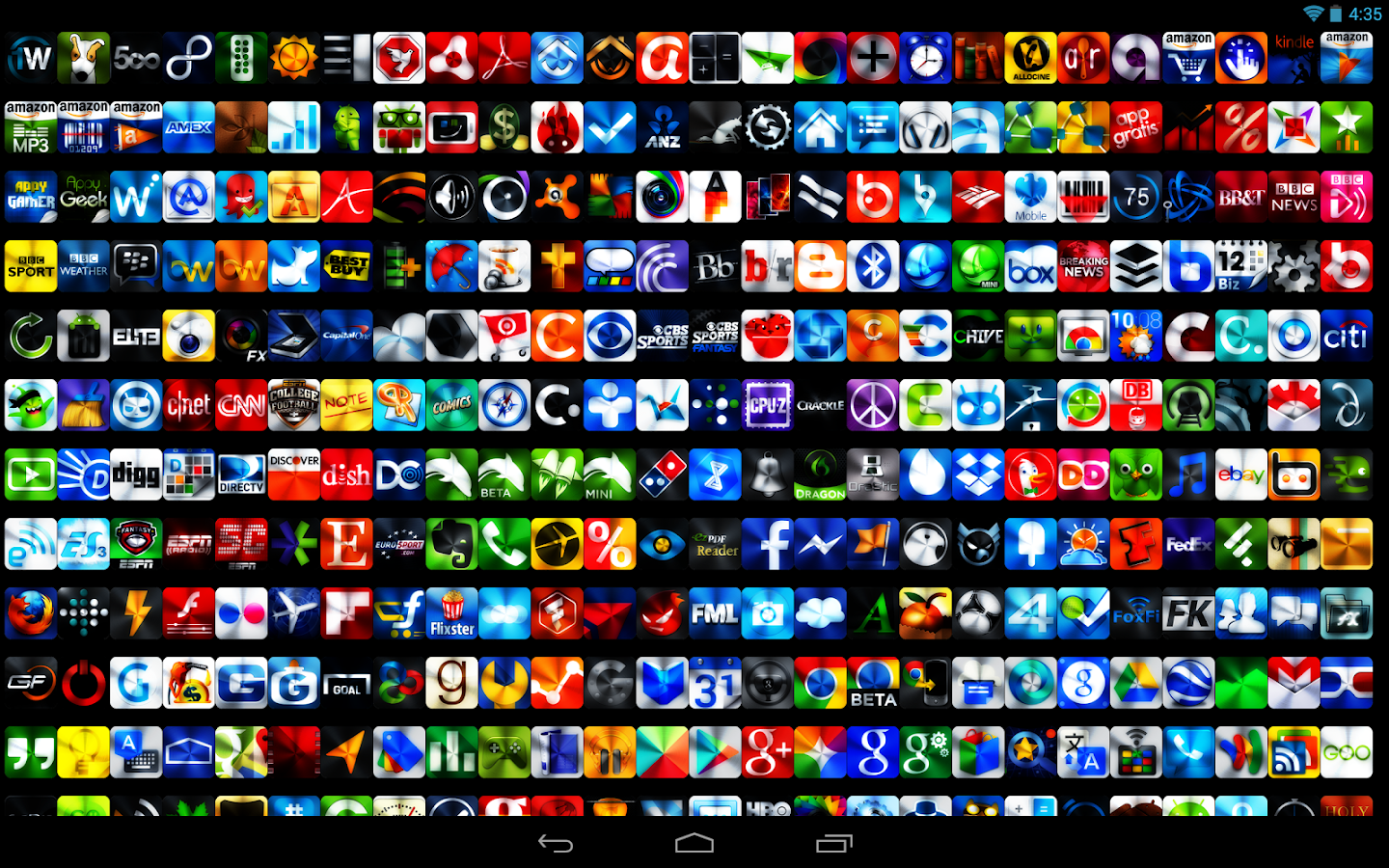
Overview: 1,000+ icons are included..with more to come in future updates!
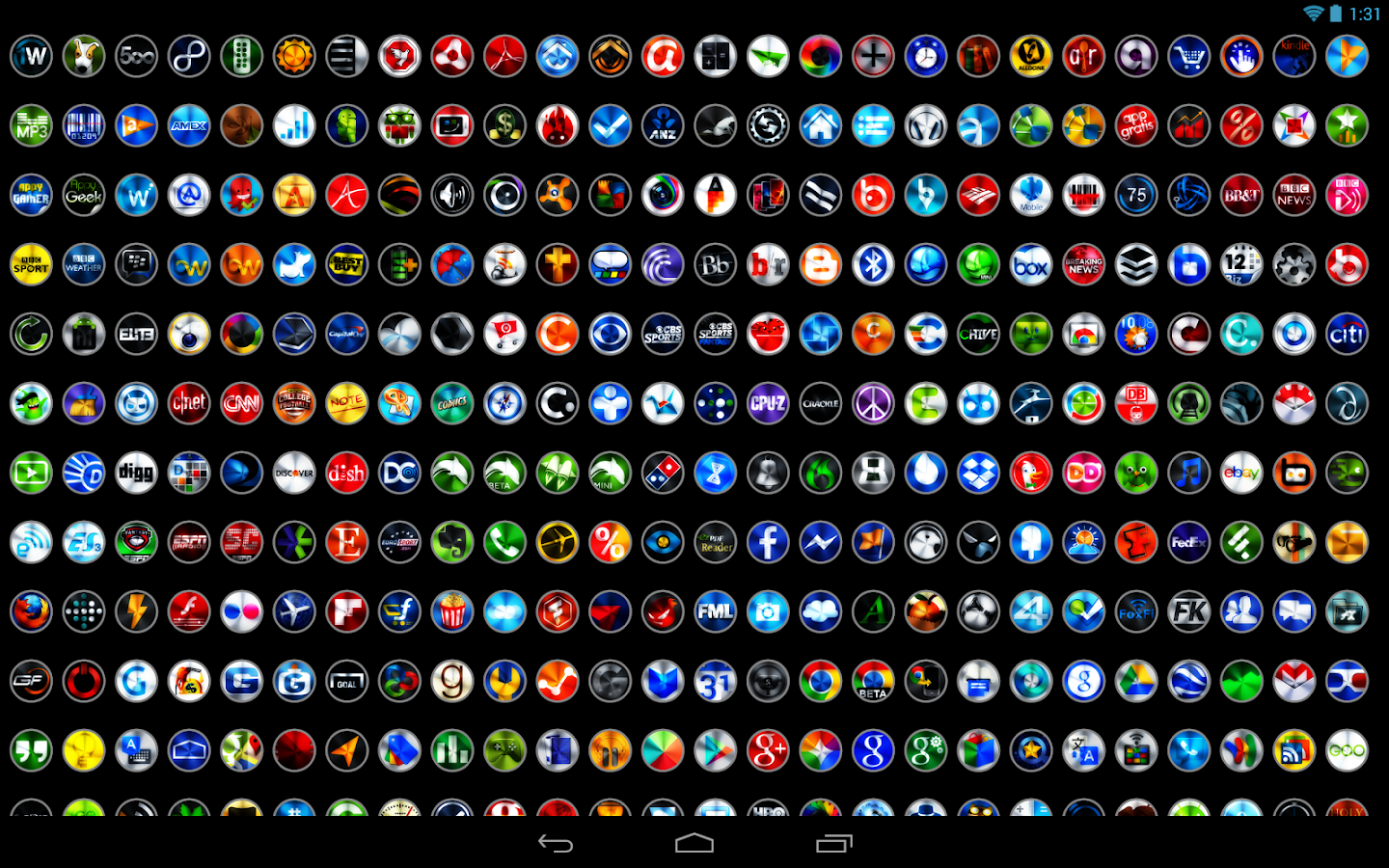
hese icons are BIG HD icons (144 px). So, if your launcher supports icon size changing increase the size to have even bigger HD icons!
The following custom launchers are currently supported for this icon pack :
*Nova Launcher
*Apex Launcher
*ADW Launcher / EX
*GO Launcher EX
*Holo Launcher
*Desktop Visualizer (see MANUAL APPLY section below)
*Other custom launchers may support this icon pack as well but are not guaranteed to work.
==================
MORE THEMES BY STEALTHYCHIEF
==================
Search Stealthychief in the Google Play Store to see all of our themes. We have a very wide variety of popular styles and designs. Search Stealthychief today to find your new favorite theme for your Android device! http://bit.ly/KbYlAi
Be sure and check out our NEW website to see our latest releases and updates - Home Page Stealthychief DesignsStealthychief Designs
Follow us on Twitter @Stealthychief - http://bit.ly/KOFxZ6
==================
DESCRIPTION
==================
This is a icon pack with colorful HD icons. Slightly minimal yet ultra sharp, these icons go well with just about any setup. Perfect for users of the original Vivid icon pack, colorful icon packs, and colorful themes.
==================
AUTOMATIC APPLY OF ICONS
==================
Nova Launcher
1.Go to Nova Settings
2. Select Look and Feel
3. Select Icon Theme
4. Select the icon pack you have downloaded
5. Select the box next to Icon Pack
6. Select Apply
Apex Launcher
1. Go to Apex Settings
2. Select Theme Settings
3. Select the Icon Pack you have downloaded
4. Check the box next to Icon Pack on the next screen
5. Select Apply
GO Launcher EX
1. Go to GO Launcher Settings
2. Select Visual Settings
3. Scroll over to Icons
4. Select the icon pack you have downloaded under each of the Icon Style
ADW/EX
1. Go to ADWSettings
2. Select Themes
3. Select the icon pack you have downloaded
4. Select Apply
==================
MANUAL APPLY OF ICONS
==================
Desktop Visualizer (Big Icons - 200 px)
1. Open the Icon Pack you downloaded from your application drawer
2. Scroll down and select Big Icons
3. Select an icon you would like to use by pressing on the icon.
4. On the next screen, long press the image and select save image. Some icons at the bottom may not load so manually scrolling through the bottom section may be required.
5. Download Desktop Visualizer (if not already). It's a free app.
6. Add a widget to your home screen and select Desktop Visualizer and select the 2 x 2 widget. Select the widget on the home screen
7. Select the "Select Icon" button. Select from Image file
8. Choose the Gallery (or gallery related app like QuicPic) and select the Download Folder
9. Select the icon you want to use
10. Complete the rest of the options for the widget within Desktop Visualizer and select Ok.
You can also apply the icons manually for each launcher the icon pack supports. To do this just long press an icon on a home screen and select replace/edit and select the icon you wish to replace it with from the icon pack you downloaded.
What's New
v2.2.8 - 1/24/2014
- 30 new/updated icons
- See the new icons here - http://bit.ly/stealthychief228
- Activity fixes
This app has NO advertisements
More Info:
Code:
Download Instructions
stealthychief-icon-pack-viv…zip (12,57 MB) - uploaded.net
Mirror:
Download stealthychief icon pack vivid 229 zip
http://turbobit.net/53kmctwgcynp.html
Requirements: 4.0 and up
Overview: 1,000+ icons are included..with more to come in future updates!
hese icons are BIG HD icons (144 px). So, if your launcher supports icon size changing increase the size to have even bigger HD icons!
The following custom launchers are currently supported for this icon pack :
*Nova Launcher
*Apex Launcher
*ADW Launcher / EX
*GO Launcher EX
*Holo Launcher
*Desktop Visualizer (see MANUAL APPLY section below)
*Other custom launchers may support this icon pack as well but are not guaranteed to work.
==================
MORE THEMES BY STEALTHYCHIEF
==================
Search Stealthychief in the Google Play Store to see all of our themes. We have a very wide variety of popular styles and designs. Search Stealthychief today to find your new favorite theme for your Android device! http://bit.ly/KbYlAi
Be sure and check out our NEW website to see our latest releases and updates - Home Page Stealthychief DesignsStealthychief Designs
Follow us on Twitter @Stealthychief - http://bit.ly/KOFxZ6
==================
DESCRIPTION
==================
This is a icon pack with colorful HD icons. Slightly minimal yet ultra sharp, these icons go well with just about any setup. Perfect for users of the original Vivid icon pack, colorful icon packs, and colorful themes.
==================
AUTOMATIC APPLY OF ICONS
==================
Nova Launcher
1.Go to Nova Settings
2. Select Look and Feel
3. Select Icon Theme
4. Select the icon pack you have downloaded
5. Select the box next to Icon Pack
6. Select Apply
Apex Launcher
1. Go to Apex Settings
2. Select Theme Settings
3. Select the Icon Pack you have downloaded
4. Check the box next to Icon Pack on the next screen
5. Select Apply
GO Launcher EX
1. Go to GO Launcher Settings
2. Select Visual Settings
3. Scroll over to Icons
4. Select the icon pack you have downloaded under each of the Icon Style
ADW/EX
1. Go to ADWSettings
2. Select Themes
3. Select the icon pack you have downloaded
4. Select Apply
==================
MANUAL APPLY OF ICONS
==================
Desktop Visualizer (Big Icons - 200 px)
1. Open the Icon Pack you downloaded from your application drawer
2. Scroll down and select Big Icons
3. Select an icon you would like to use by pressing on the icon.
4. On the next screen, long press the image and select save image. Some icons at the bottom may not load so manually scrolling through the bottom section may be required.
5. Download Desktop Visualizer (if not already). It's a free app.
6. Add a widget to your home screen and select Desktop Visualizer and select the 2 x 2 widget. Select the widget on the home screen
7. Select the "Select Icon" button. Select from Image file
8. Choose the Gallery (or gallery related app like QuicPic) and select the Download Folder
9. Select the icon you want to use
10. Complete the rest of the options for the widget within Desktop Visualizer and select Ok.
You can also apply the icons manually for each launcher the icon pack supports. To do this just long press an icon on a home screen and select replace/edit and select the icon you wish to replace it with from the icon pack you downloaded.
What's New
v2.2.8 - 1/24/2014
- 30 new/updated icons
- See the new icons here - http://bit.ly/stealthychief228
- Activity fixes
This app has NO advertisements
More Info:
Code:
https://play.google.com/store/apps/details?id=stealthychief.icon.pack.vivid.v2Download Instructions
stealthychief-icon-pack-viv…zip (12,57 MB) - uploaded.net
Mirror:
Download stealthychief icon pack vivid 229 zip
http://turbobit.net/53kmctwgcynp.html