Sunday, January 26, 2014

[Jailbreak Tweak] SubtleLock gives iOS 7 Lock screen a more minimalistic look

6:00 AM
Apple completely revamped the lock screen in iOS 7 to give it a clean and minimalistic look.
The popular Lock screen tweak SubtleLock has been updated for iOS 7, which allows you to give the Lock screen a more minimalistic look as you can see above.
It reduces the size of the clock, stuffs the clock and date in single row, thus giving Notifications more space to breathe.
It offers quite a few configuration options such as the ability to add seconds to the clock, hide the date and clock, hide the Camera grabber icon etc.
It also allows you to hide the Notification Centre and Control Center grabbers at the top and bottom, which results in giving even more space to incoming Notifications as the slide to unlock text is pushed down and Clock & date field is moved to the top of the screen. You can also change the color of the text of the Clock and date fields using a RGB slider.


SubtleLock2
SubtleLock by Michael Poole is available on Cydia for $0.99. If you had purchased it, then you can install it for free.
Let me know what you think in the comments.

QuickContacts: Cool New Tweak gives you quick access to your Favorite Contacts from Home screen

5:54 AM
QuickContacts
QuickContacts is a cool new iOS 7 jailbreak tweak that gives you quick access to your favorite Contacts from the Home screen.
The jailbreak tweak essentially takes over the area occupied by Spotlight when you swipe down on the Home screen. You can still access Spotlight by swiping to the left.
If you’ve added photos to your contacts in the Phone app then they will show up when you swipe down on Spotlight or just show the name.
When you tap on the Contact photos, it displays a popup of the contact and gives you an option to call, message or email that Contact.
You need to set the favorites manually by tapping on the icon with the + badge. It would have been nice if the tweak could have pulled the favorites from the Phone app as it would be a pain to manage two lists in the long term.
After you’ve added a favorite, you can always change it by tapping and holding on the icon.
Check out the video walkthrough of the jailbreak tweak in action below:
QuickContacts is a cool jailbreak tweak if you don’t like the idea of add your favorite Contacts to the Notification and clutter it further. However, you need to be on the Home screen to access the Contacts with this tweak, which is a drawback over tweaks like Favorite Contacts 7 that allow you to access the favorites from anywhere in iOS.
QuickContacts is available on Cydia for $1.99. Few issues that you should be aware of before you buy the tweak:


  • It worked well on my iPhone 5, but I was not able to add more than 4 contacts on my iPhone 5, as I couldn’t swipe to the right. So I would recommend iPhone 5s users to hold off buying it until the issues are fixed.
  • If you’ve multiple numbers for a Contact, and want to add one of them as the favorite then it is not possible. It just dials the first number. This is the reason I think the developer should have used the favorite Contacts from the Phone app.
  • You have to add a photo to your Favorite contacts in the Phone app, otherwise it is difficult to figure out which one to tap as it just shows the same icon for all the contacts without photos.
Let me know how it goes in the comments.

Springtomize 3 for iOS 7 is out

5:44 AM
springtomize3-0
Springtomize 3, one of the most awaited jailbreak tweaks for iOS 7 has just hit Cydia.
In case you’re not aware,Springtomize allows you to customize every aspect of iOS. You can do things such as increase the number of apps in the dock to 10, give the dock a cool coverflow effect, change the duration of the system-wide animations, remove page limits, customize the default animations, customize the lock screen, hide stock app icons and lots more.
According to Bigarella, Springtomize 3 is a completely new product, which has be rewritten from ground up, completely re-engineered, and will include support for iOS 7.
Here’s a brief description of Springtomize 3 from Cydia:


Springtomize 3 is the ultimate utility for your iDevice! It’s the only customization tweak you’ll ever need. It features plenty of options to customize even the smallest aspect of your device(s). Every single option includes a brief explanation of its effect, making it very easy to use. The whole application has been localized in 20 different languages, so everyone will be able to use it without an issue.
Get Springtomize 3 today and start personalizing your device like never before.
Springtomize 3 is available on Cydia for $2.99. If you had purchased Springtomize 2, then you can upgrade to the latest version for $1.99.
We’re working on a detailed video walkthrough of Springtomize 3, so don’t forget to subscribe to our YouTube channel.
Update:
Check out how you can customize iOS 7 with Springtomize 3.
Let me know how it goes in the comments.

How to Customize iOS 7 with Springtomize 3

5:29 AM

[Updated: Video Walkthrough]

Springtomize 3, one of the most eagerly awaited jailbreak tweaks for iOS 7 was released earlier today.
There is a good reason why Springtomize by Filippo Bigarella has been so popular. It is the mother of all jailbreak tweaks that allows you to customize almost every aspect of iOS.
Springtomize 3 has be rewritten from ground up, completely re-engineered, and includes support for iOS 7. It allows you to customize the following:

  • Animations
  • App Slider
  • Control Center
  • Dock
  • Folders
  • Icons
  • Lock Screen
  • Pages
  • Status Bar
springtomize3-0
I will go through each section to give you a good idea of all the things you can customize or tweak with Springtomize 3. The various settings can be configured using the standalone Springtomize app.
Animations:
You can modify the duration of the animations by enabling the Custom Speed toggle (Springtomize > Animations). iOS 7 feels a lot snappier when you move the slider all the way to the left.


springtomize3- animations
App Slider:
This section allows you to customize the following the app switcher or multitasking tray:
  • Hide the icon below the app previews.
  • Resize app switcher pages.
  • You can change the Home action to Respring, which will allow you to swipe on the Home screen card to respring the device.
springtomize-appslider-1
App Switcher with the size of Home screen pages reduced by 10% and without the icon
Control Center:
In this section you can hide Control Center sections such as Quick Launch, Brightness controls, media controls, Airdrop and Settings. You can also hide the line separator.
springtomize3-controlcenter
Control Center without the line separators
Dock:
This section allows you to customize your iPhone’s dock. You can do the following:
  • You can hide the iPhone dock
  • Lets you make the background of the iPhone dock transparent.
  • You can resize the icons in the iPhone dock, which can be handy if you want to add 5 icons to the iPhone dock.
  • You can also give the cool coverflow effect to the dock as you can see below.
springtomize3-dock
Customized iPhone dock without the background, smaller icons without the labels and coverflow effect
Folders:
Springtomize 3 lets you enhance iOS folders in a number of ways such as:
  • Enables nested folders, so you can add a folder in a folder thus allowing you to reduce the clutter on your iPhone’s Home screen.
  • You can enable the pinch to close gesture for folders.
  • You can make the background of the folders transparent.
  • You can tweak the animations speed to make the opening and closing of folders snappier.
  • It allows you to change the size of the icon and hide the labels.
  • You can also give the coverflow effect to the apps in the folder.
  • It allows you to change the layout of icons on the Home screen. So you can increase the number of columns and rows (of icons). on the Home screen.
springtomize3-folders
A folder with transparent background and nested folder
Icons:
  • You can hide the recently updated badge on the Home screen.
  • Lock the layout of the icons to prevent them from being moved.
  • Disable the wiggling animation that occurs after long pressing the Home button.
  • You can also prevent the apps from being uninstalled by disabling the uninstall option.
  • Hide badges from all icons.
  • You can also change the style of the icons by changing the icon image effect.
  • You can change the color and text of the badges.
  • You can also hide Newsstand, Springtomize or any other icons from the Home screen.
springtomize3-icons
Customized icons with black and white image effect and blue badge
Lock Screen:
Springtomize 3 also allows you to customize the Lock screen. So you can do things like:
  • You can hide the grabber for the Camera app.
  • You can change the slide to unlock text with something else.
  • It lets you change the font size and the style of the time and date that is displayed on the Lock screen. This feature is buggy as adding seconds increased the font of the date and time.
springtomize3-lockscreen
Lock screen with custom text instead of slide to unlock, seconds added to the clock, and custom font.
Pages:
It also lets you customize Home screen pages. So you can do things like:
  • You can remove the dots for the Home screen pages just above the dock.
  • You can disable Spotlight.
  • You can resize the icons on the Home screen.
  • You can hide labels for the icons. If you plan to give the Cover flow effect to the icons, then it may be a good idea to hide the labels.
  • It allows you to change the layout of icons on the Home screen. So you can increase the number of columns and rows (of icons). on the Home screen.
springtomize3-pages
Customized Home screen pages with 5 coloums and without the dots for the Home screen pages
Status Bar:
Springtomize allows you to customize the Status bar. So you can change the following:
  • You can change the Carrier logo with a custom text string.
  • You can also replace the time that is displayed on the Status bar with a custom string.
  • It also allows you to hide all the status bar indicates by tapping on the appropriate On/Off toggles.
springtomize3-statusbar
Status bar with custom text instead of the time
When you make a change, Springtomize will prompt you to apply the changes in the Status bar, tap on it to respring the SpringBoard.
Checkout the detailed walkthrough of Springtomize 3 below:
Springtomize 3 is available on Cydia for $2.99. If you had purchased Springtomize 2 then you can upgrade to the latest version for $1.99.
Please note that readers with iPhone 5s have reported issues with Springtomize 3, so iPhone 5s users may want to wait until the issues are resolved before buying it. There are also some compatibility issues with GridLock and Bigify+, so you will have to uninstall them to avoid running into issues with Springtomize 3.

Let me know what’s your favorite customization trick using Springtomize 3 in the comments.

Crazy Taxi v1.0.0

3:33 AM
Crazy Taxi v1.0.0
Required Android O/S : 2.2+
Crazy Taxi v1.0.0
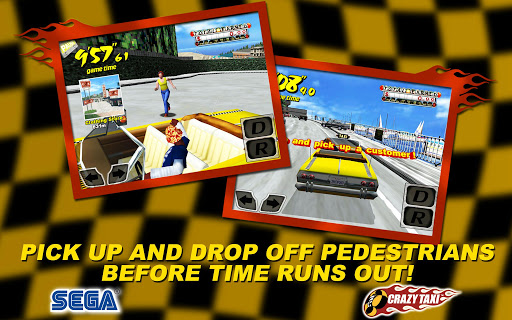
Hey hey, come on over and have some fun with Crazy Taxi! Barrel through traffic packed streets, hurdle off parking garages, and crazy comboyour way to crazy money in a wild frantic race to scare up the most fares. In Crazy Taxi, time is money, and only the craziest cabbies come out victorious.
TRANSPORT BACK TO 2000
-Remastered for mobile devices based on the hugely popular Dreamcast Classic
-Rock out to original music by The Offspring and Bad Religion
FIERCE ENVIRONMENTS TO MAKE YOUR PASSENGERS GO INSANE
-Extra large hills for extra long hang time
-Parked transporters with conveniently angled ramps
-Occasional deep sea exploration opportunities
DONT GET TOO DELIRIOUS
-Choose from 3, 5 or 10 minute game play in Arcade Mode and Original Mode
-Play in touch or tilt control modes
OTHER FEATURES:
-Continue the madness with 16 Mini games
-Listen to tracks from your own music playlist
-Universal Build - Buy once and play across multiple devices
-Controller Support - Play with your Power A Moga, Xbox, and all HID controllers!
Crazy Taxi v1.0.0Crazy Taxi v1.0.0
Code:
https://play.google.com/store/apps/details?id=com.sega.CrazyTaxi

Download : 226Mb APK+OBBInstructions :
Install APK
Copy 'com.sega.CrazyTaxi' folder to 'sdcard/Android/Obb/'
Launch the game
Zippyshare.com - Crazy Taxi v1.0.0.part1.rar
Zippyshare.com - Crazy Taxi v1.0.0.part2.rar


emobilescommunity.blogspot.com

Toggle Footer